
UMA 2.0 (User-Managed Access)
User-Managed Access (UMA) is an OAuth-based protocol that enables a resource owner to control access to their protected resources. Unlike traditional OAuth where the resource server decides access, UMA introduces an asynchronous approval model — a user can request access to a resource, and the resource owner can review and approve (or deny) that request later.
Demo
Login & Resource Owner Access
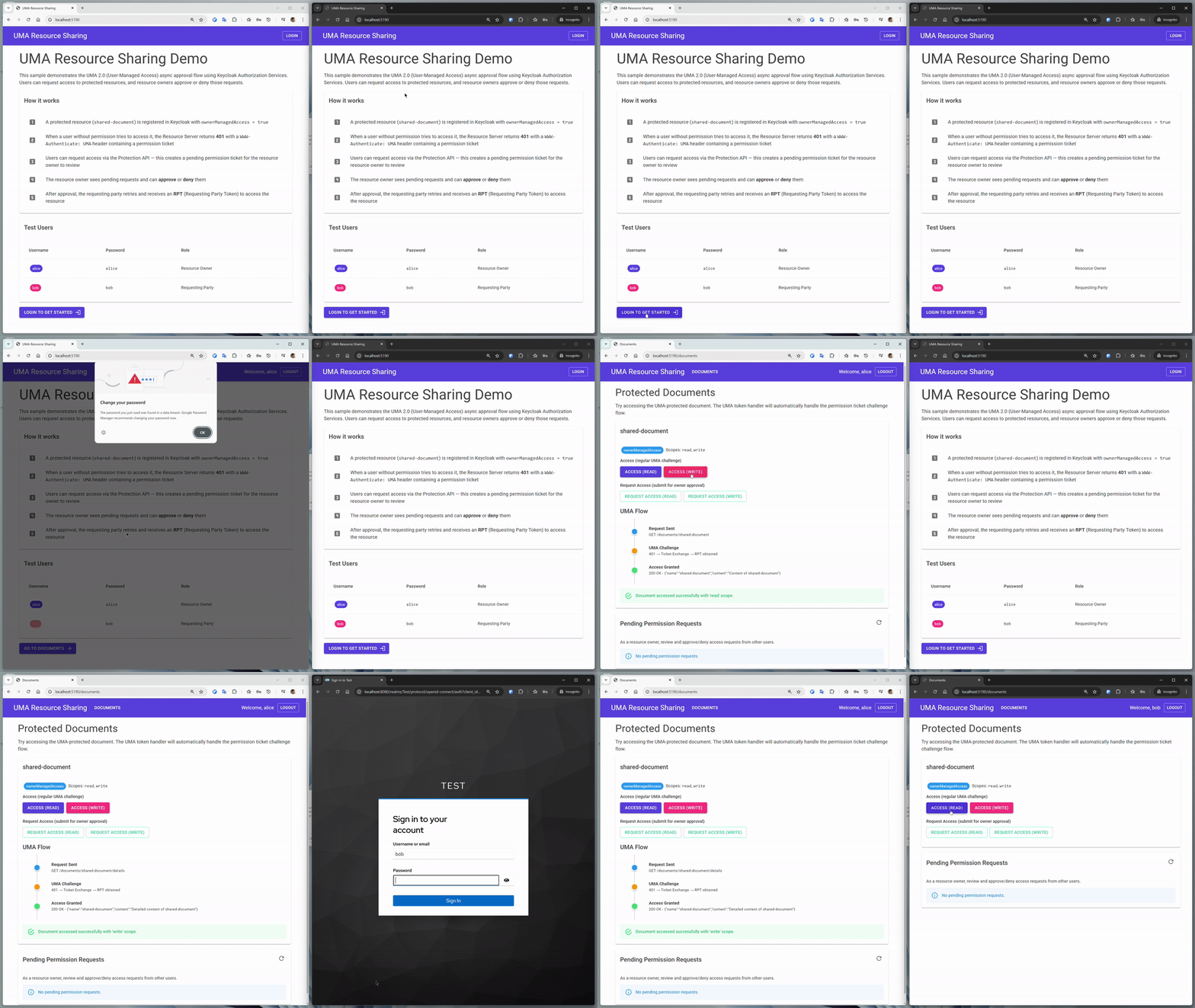
Request Access & Owner Approval
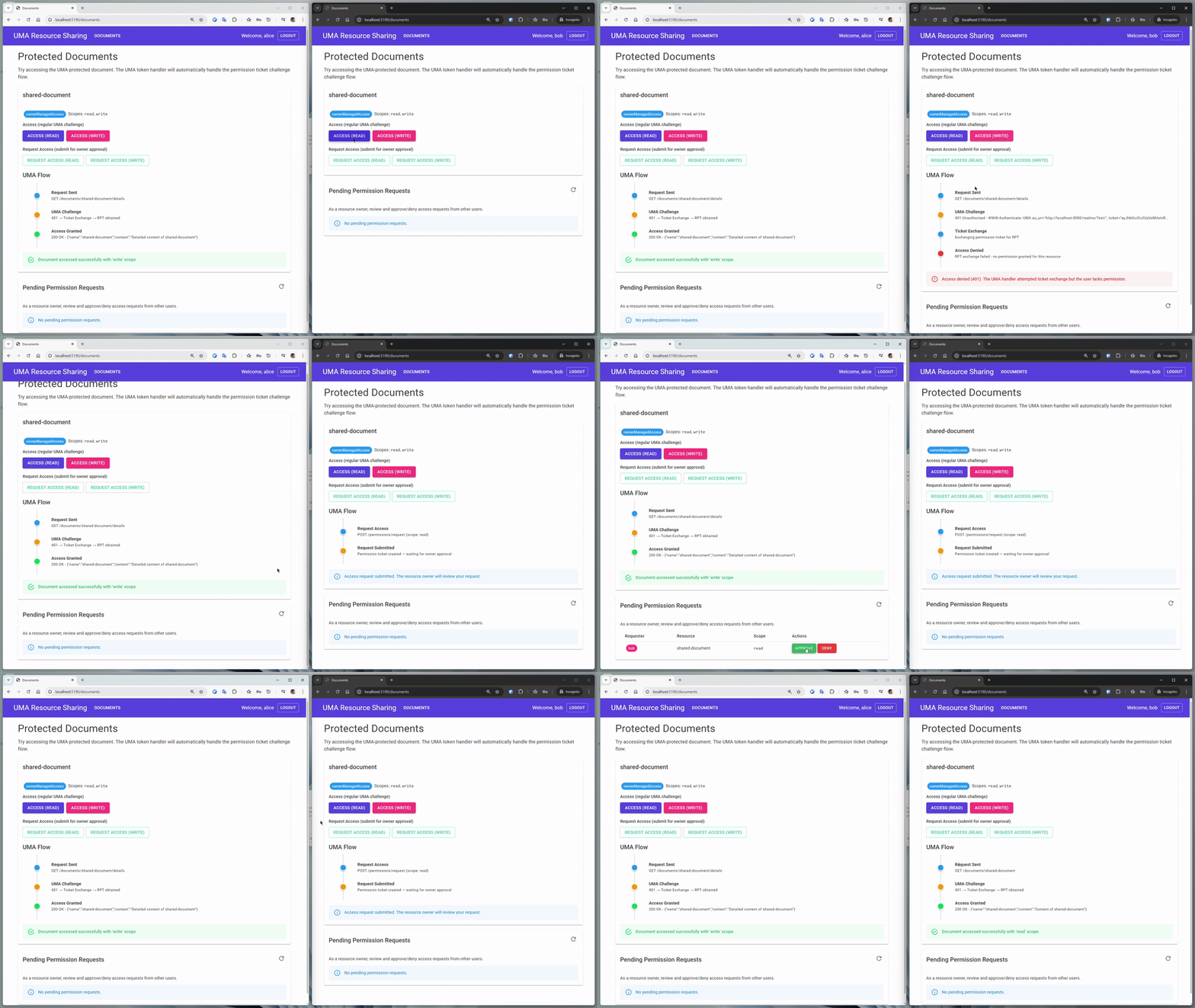
Access Denied (Insufficient Permissions)
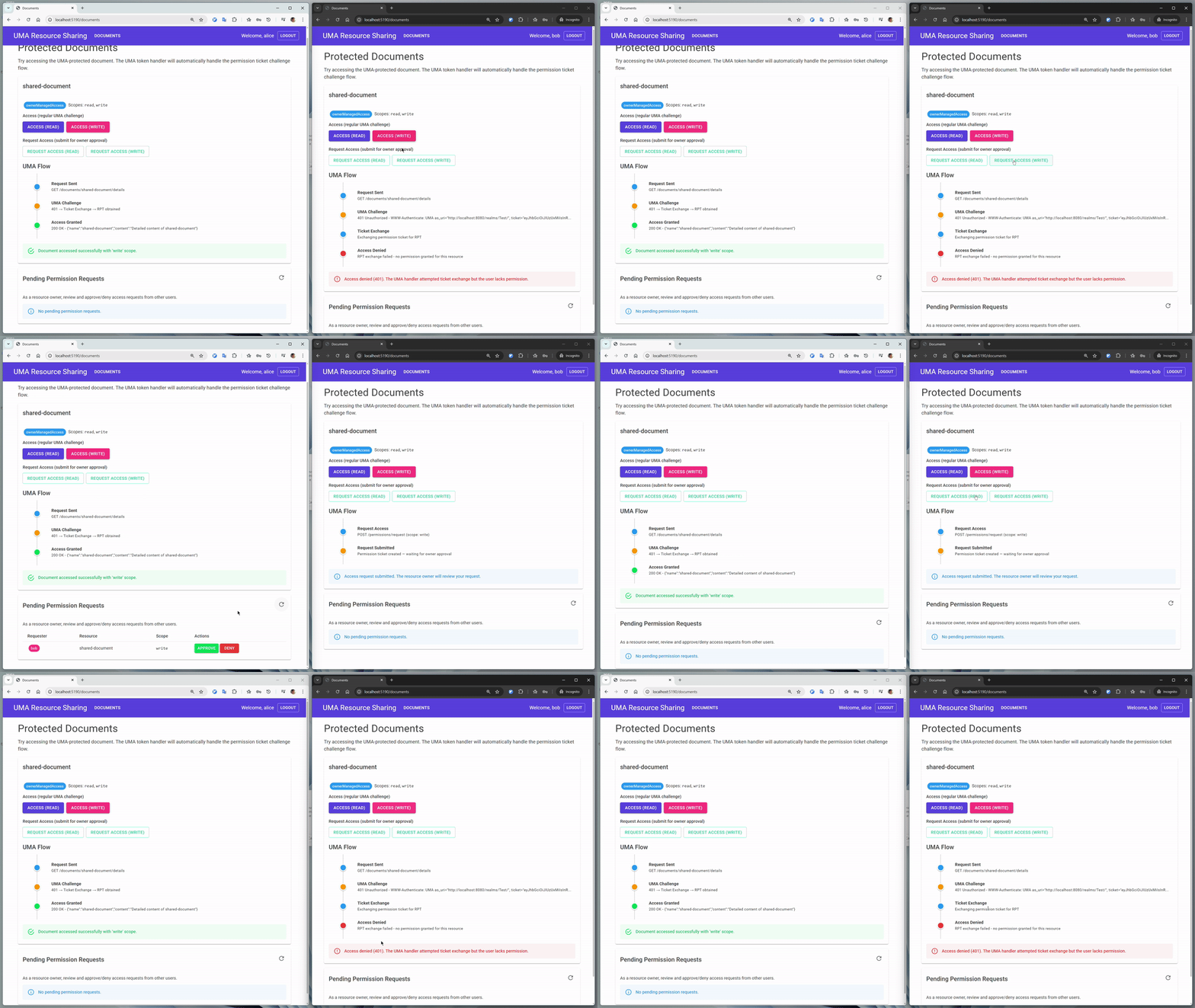
Key Concepts
| Concept | Description |
|---|---|
| Resource Owner | The user who owns the protected resource (e.g., alice) |
| Requesting Party | A user who wants to access someone else's resource (e.g., bob) |
| Resource Server | The API that hosts and protects resources |
| Authorization Server | Keycloak — evaluates policies and issues permission tickets and RPTs |
| Permission Ticket | A one-time challenge token representing an access request |
| RPT (Requesting Party Token) | An access token enriched with specific resource permissions |
| Permission Request | A pending approval request created via the Protection API Permission Ticket endpoint |
TIP
See Keycloak's documentation — Authorization Services: UMA for the full protocol specification.
UMA Challenge-Response Flow
The core UMA flow is a challenge-response mechanism between the client, resource server, and Keycloak:
Async Approval Flow
When a user has no permission, they can submit a permission request. The resource owner reviews and approves it later:
Architecture Patterns
Keycloak.AuthServices supports two architecture patterns for UMA:
Pattern 1: Separate Resource Server (Web API + Client)
The client app and resource server are separate projects. A UmaTokenHandler (DelegatingHandler) transparently intercepts 401+UMA challenges between the client and the API.
Use when: You have a dedicated Web API that multiple clients consume.
Key components:
- Resource Server uses
AddUmaPermissionTicketChallenge()to returnWWW-Authenticate: UMAon authorization failure - Client uses
UmaTokenHandlerfromKeycloak.AuthServices.Authorization.Umato handle the ticket-for-RPT exchange transparently - Protected endpoints use
.RequireProtectedResource("resource", "scope")
Pattern 2: Self-Contained (Single App)
The app is the resource server — authorization checks and permission ticket management happen inline. No HTTP calls to intercept.
Use when: Your app serves both the UI and the protected resources directly.
Key components:
- Authorization policies checked programmatically via
IAuthorizationService - Permission tickets managed directly via
IKeycloakProtectionClient - No
UmaTokenHandlerorAddUmaPermissionTicketChallenge()needed
Setup
Packages
dotnet add package Keycloak.AuthServices.Authorization
dotnet add package Keycloak.AuthServices.Sdk
For the separate resource server pattern, also add:
dotnet add package Keycloak.AuthServices.Authorization.UmaSeparate Resource Server Pattern
Resource Server — protects endpoints and returns UMA challenges:
// Authorization + UMA challenge handler
services.AddAuthorization().AddKeycloakAuthorization().AddUmaPermissionTicketChallenge();

services.AddAuthorizationServer(configuration).AddStandardResilienceHandler();

// Protection API client for permission ticket management
services.AddKeycloakProtectionHttpClient(configuration)
    .AddClientCredentialsTokenHandler(tokenClientName);

// Protected endpoints
app.MapGet("/documents/{name}", (string name) => new { name })
    .RequireProtectedResource("shared-document", "read");
Client App — handles UMA challenge-response transparently:
// Register UMA ticket exchange client
services.AddKeycloakUmaTicketExchangeHttpClient(configuration);

// HTTP client with UMA token handler
services.AddHttpClient("ResourceServer", client =>
    {
        client.BaseAddress = new Uri("https://resource-server");
    })
    .AddUmaTokenHandler();
The UmaTokenHandler automatically:
- Attaches the user's access token to outgoing requests
- Detects
401responses withWWW-Authenticate: UMAheaders - Extracts the permission ticket from the header
- Exchanges the ticket for an RPT via Keycloak's token endpoint
- Retries the original request with the RPT
Self-Contained Pattern
A single app acts as both the OIDC client and the resource server:
// OIDC authentication (cookie-based, for browser login)
services.AddAuthentication(options =>
    {
        options.DefaultScheme = CookieAuthenticationDefaults.AuthenticationScheme;
        options.DefaultChallengeScheme = OpenIdConnectDefaults.AuthenticationScheme;
    })
    .AddKeycloakWebApp(configuration.GetSection("Keycloak"),
        configureOpenIdConnectOptions: options =>
        {
            options.SaveTokens = true;
            options.MapInboundClaims = false; // keep "sub" claim name
        });

// Keycloak authorization with named policies
services.AddAuthorization()
    .AddKeycloakAuthorization()
    .AddAuthorizationBuilder()
    .AddPolicy("UmaRead", policy =>
        policy.RequireProtectedResource("shared-document", "read"))
    .AddPolicy("UmaWrite", policy =>
        policy.RequireProtectedResource("shared-document", "write"));

// Authorization server client (evaluates permissions against Keycloak)
services.AddAuthorizationServer(options =>
    {
        configuration.GetSection("Keycloak").BindKeycloakOptions(options);
        options.Resource = "uma-resource-server";
        options.Credentials = new() { Secret = "uma-resource-server-secret" };
    })
    .AddStandardResilienceHandler();

// Protection API client (permission ticket management)
services.AddKeycloakProtectionHttpClient(options =>
    {
        configuration.GetSection("Keycloak").BindKeycloakOptions(options);
        options.Resource = "uma-resource-server";
        options.Credentials = new() { Secret = "uma-resource-server-secret" };
    })
    .AddClientCredentialsTokenHandler(tokenClientName);
IMPORTANT
When using cookie authentication with IAuthorizationService, set MapInboundClaims = false in the OIDC options to preserve the sub claim name. Otherwise, the OIDC middleware maps it to a long .NET claim URI and User.FindFirstValue("sub") returns null.
Programmatic Authorization Checks
In the self-contained pattern, use IAuthorizationService to check permissions in page handlers instead of page-level [Authorize(Policy=...)] attributes (which would return a raw 401 to the browser):
[Authorize]
public class DetailsModel(IAuthorizationService authorizationService) : PageModel
{
    public bool AccessGranted { get; set; }

    public async Task OnGetAsync(string name, string scope = "read")
    {
        var policyName = scope == "write" ? "UmaWrite" : "UmaRead";
        var result = await authorizationService.AuthorizeAsync(User, policyName);

        if (result.Succeeded)
        {
            AccessGranted = true;
        }
    }
}
Permission Ticket Management
Use IKeycloakProtectionClient directly for creating, listing, approving, and denying permission requests:
// Create a permission request
var ticket = new PermissionTicket
{
    Resource = resourceId,
    Requester = userId,
    ScopeName = "read",
    Granted = false,
};
await protectionClient.CreateStoredPermissionTicketWithResponseAsync(realm, ticket);

// List pending tickets
var tickets = await protectionClient.GetPermissionTicketsAsync(realm,
    new GetPermissionTicketsRequestParameters { Granted = false, ReturnNames = true });

// Approve a ticket
await protectionClient.UpdatePermissionTicketAsync(realm,
    new PermissionTicket { Id = ticketId, Granted = true });

// Deny (delete) a ticket
await protectionClient.DeletePermissionTicketAsync(realm, ticketId);
Keycloak Configuration
UMA requires specific Keycloak setup:
- Resource Server Client — a confidential client with Authorization Services enabled
- UMA Resource — a resource with
ownerManagedAccess: trueand defined scopes (e.g.,read,write) - Owner Policy — grants the resource owner full access
- OIDC Client — for user login (with audience mapper for the resource server client)
TIP
The UMA Resource Sharing samples include pre-configured Keycloak realm exports with all required clients, resources, and policies.
Samples
| Sample | Pattern | Description |
|---|---|---|
| Blazor + Resource Server | Separate | Blazor Server client + Minimal API resource server. UmaTokenHandler handles 401+UMA challenges transparently. |
| Razor Pages (Self-Contained) | Self-Contained | Single Razor Pages app. Uses IAuthorizationService for inline checks and IKeycloakProtectionClient for ticket management. |