
TL;DR: scratch organizes the temporary knowledge an agent produces — notes, snippets, command output, intermediate artifacts — into a scratchpad: a folder plus a scratchpad.json manifest, kept out of your source tree. It’s a thin metadata layer over the filesystem, not a database.
Install with bun add -g @nikiforovall/scratchpad
Docs & live demo: nikiforovall.blog/scratchpad/
Why files: the context window is a real limit
One constraint shapes everything else: agents work better when they write things down.
The context window is the agent’s only short-term memory — the running transcript of the task so far is all it can actually “see.” That transcript is finite. Once it fills up, the oldest parts drop off to make room: findings, decisions, the command output from twenty steps ago. There’s no warning; the model just quietly forgets. Long-horizon tasks fail less because the model is incapable and more because the memory it needed is gone.
The fix is almost boring: externalize that memory to the filesystem. Write the plan to a .md file. Write findings to a .md file. Now the agent re-reads exactly what it needs, when it needs it, instead of hoping it’s still in context — and a markdown file is durable, greppable, diffable, and survives a compaction. “Markdown files are all you need” is becoming a real pattern, not a hack.
So agents should write to disk. The open question is what happens to those files next.
The problem: temporary agent knowledge has nowhere to go
Spend a session with a coding agent and watch what it produces. It greps the codebase and finds five relevant files. It writes a quick design note before touching code. It runs the test suite and the failure output is what it reasons about next. It sketches a mermaid diagram to make sense of a flow.
All of that is real, useful work. And almost none of it sticks around.
Agents generate a lot of temporary knowledge per session, and nothing keeps track of it. It ends up scattered across the repo, buried in chat history, or lost when the context window rolls over.
The knowledge is temporary — tied to a session or a task, not to the project forever — but “temporary” shouldn’t mean “lost” or “scattered.”
The solution: a scratchpad is just a folder
A scratchpad is a folder containing a scratchpad.json manifest. The folder path is its identity — there’s no central store, no daemon, no SQLite file hidden away under your config. scratch is a thin metadata layer over the filesystem: it creates pads, registers files with a description and type, and shows you what’s there.
The agent writes files with its normal tools. Then it registers each one:
scratch new "auth-refactor" --dir _scratchpads
# → creates _scratchpads/auth-refactor/ + scratchpad.json

# agent writes _scratchpads/auth-refactor/findings.md with its normal tools, then:
scratch add "auth-refactor" findings.md \
  --desc "where the current token flow breaks" \
  --type note --tag auth,investigation
The --desc is the point: it captures why this file exists, not just that it does. Months later — or two compactions later — that one line is the difference between a useful artifact and a mystery file.
Two things make this pleasant in practice. First, no lock-in: it’s files on disk. Delete the folder and the knowledge is gone; the CLI never authors, copies, or moves your content. Second, a human can actually read it.
The demo: see what the agent gathered
Run scratch ui and you get a read-only, two-pane viewer in a “Lab Notebook” theme that auto-detects light/dark:
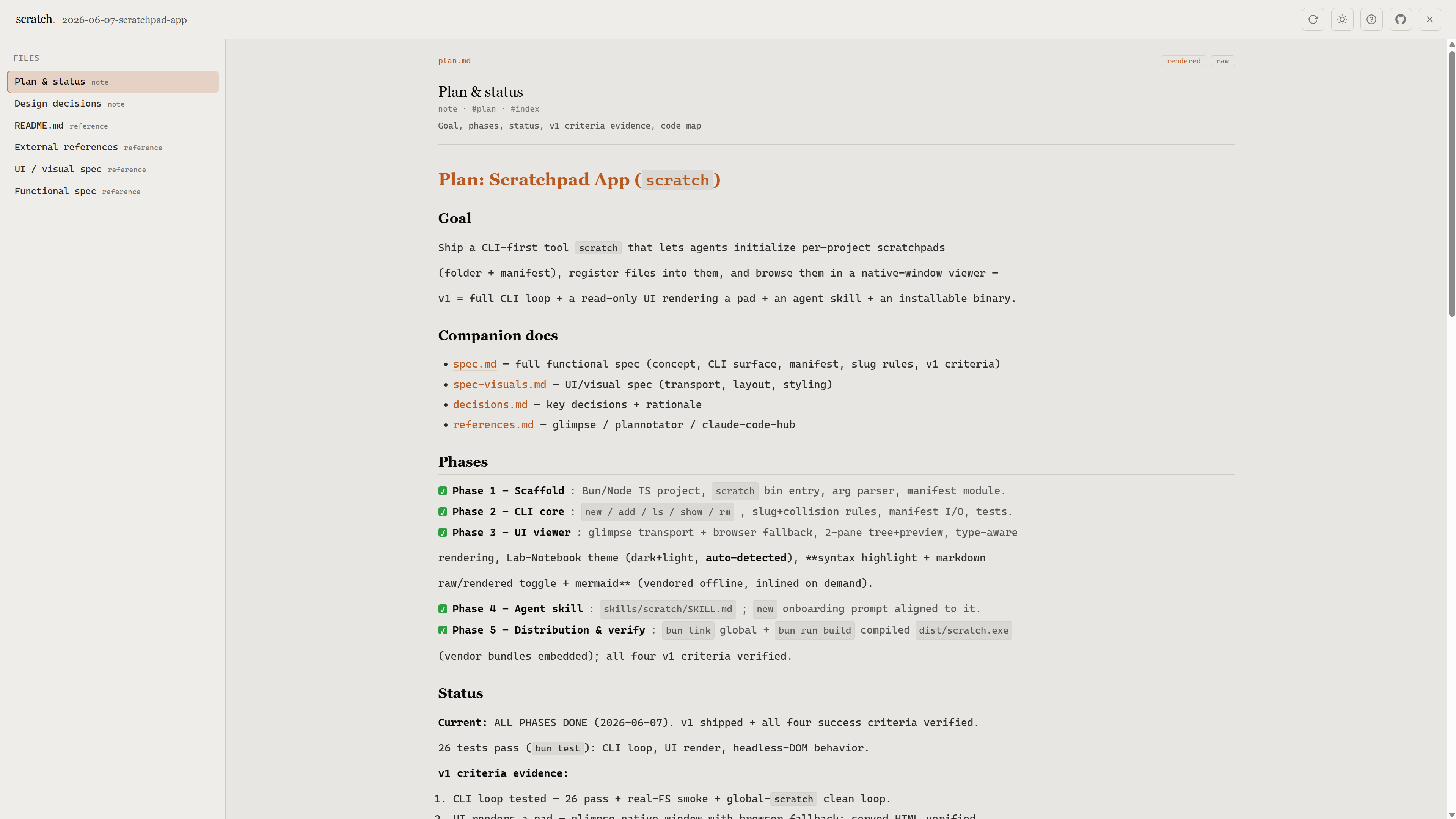
Markdown is rendered (with a raw/rendered toggle), code is syntax-highlighted, mermaid diagrams draw, images show inline. It opens a native window by default and falls back to your browser if the native backend isn’t available.
Scratchpads are also shareable. scratch export bundles a whole pad into a single self-contained HTML file — file contents embedded, no server needed — that you can hand to a teammate or link from anywhere. Here’s one exported live:
Try it: a scratchpad, exported →
No digging through transcripts to find what the agent learned. You open the viewer — or the exported file — and browse.
Wiring it into Claude Code
The repo doubles as a Claude Code plugin marketplace. Add it and the agent gets a scratch skill that teaches it when and how to drive the CLI — so it reaches for a scratchpad on its own when a task starts generating keepable knowledge:
/plugin marketplace add NikiforovAll/scratchpad
/plugin install scratchpad@scratchpad
The plugin ships the skill; the scratch CLI itself still comes from the install above:
bun add -g @nikiforovall/scratchpad
From there the agent runs the loop — create, write, register, browse — without you micromanaging it.
Planning with scratchpads
The plugin ships a second skill, planning-with-scratchpad, that puts a real workflow on top of the raw CLI. Its goal: use scratchpads as external memory for complex, multi-session tasks — the kind where a single Plan Mode pass isn’t enough and you need research, decisions, and rationale to survive context limits and session boundaries.
The convention is one pad per task under _plans/, and one concern per file rather than a sprawling 200-line plan.md:
-
plan.md— the index: goal, phases, status, errors. Kept lean; it’s the map, not the territory. -
research-<topic>.md— sources and findings, one file per distinct topic. -
decisions.md— options, the choice, and why (the rationale future-you needs). -
scratch-<label>.md— disposable working notes and prototypes.
The flow it encourages: research into files first, outline every phase and task in plan.md and get your approval before any code is written, then batch-create the tasks. Because every file is registered with scratch, you open scratch ui and watch the plan take shape in the viewer — the agent’s thinking laid out as browsable files instead of buried in a long transcript. You can read the plan and steer it before it turns into code.
▶ Show the full planning-with-scratchpad SKILL.md (click to expand)
---
name: planning-with-scratchpad
description: Use when user explicitly requests planning with a scratchpad, or asks for persistent tracking of a complex task that the human can browse visually. Backs planning files with the `scratch` CLI so a pad's files are registered and viewable.
disable-model-invocation: true
---

# Planning with Scratchpad

Use persistent markdown files as external memory for complex tasks. Files survive context limits and session boundaries. The files live in a **scratchpad** (a `_plans/` folder + manifest) so the human can browse the plan in the visual viewer.

**Load the `scratch` skill first** — it owns all CLI mechanics (`new`, `add`, `ls`, `show`, `ui`). This skill adds the planning conventions on top.

Use persistent files for planning, `TaskCreate` for tracking execution. Before closing session, use `AskUserQuestion` to confirm findings, decisions, and deliverables are satisfactory.

## Bundled References

Read these when you need deeper guidance on a specific aspect:

- **[reference.md](reference.md)** — Context engineering principles (Manus-inspired). Read when designing how to structure planning files for a long-running or multi-agent task.
- **[examples.md](examples.md)** — Real task examples showing different file combinations. Read when unsure which files to create for a given task shape.

## When to Use

- User explicitly requests planning/tracking with a scratchpad
- Complex multi-session tasks
- Research-heavy work requiring persistent notes
- Tasks where decisions and rationale need to be preserved

## When NOT to Use

- Simple single-session tasks (use Plan Mode instead)
- Quick fixes or small changes
- Tasks with clear requirements needing no research

## Directory Convention

One pad per task, created in `_plans/` with a date-prefixed folder:

```
scratch new "<task-name>" --dir _plans --id "$SESSION_ID"
```

This creates `_plans/YYYY-MM-DD-<slug>/`. Write files into that folder with your normal tools, then **register each** with `scratch add` so it appears in the viewer:

```
_plans/
  2026-01-08-dark-mode-toggle/
    scratchpad.json          # manifest (managed by scratch)
    plan.md
    research-css-strategies.md
    decisions.md
  2026-01-09-api-auth-refactor/
    scratchpad.json
    plan.md
    research-auth-providers.md
    research-token-storage.md
    decision-oauth-vs-saml.md
    decision-session-strategy.md
    references.md
    scratch-migration-steps.md
```

**Naming:** `YYYY-MM-DD-task-name` (kebab-case, concise description) — `scratch new` derives this from the task name + date.

## File Types — One Concern Per File

Each file owns a single concern. Never merge concerns into one file — a 200-line plan.md that also contains research notes, decisions, and scratch work is hard to navigate and easy to lose track of. Split early; you can always cross-reference with relative links. Register each file with the matching `scratch add --type`.

| File                  | Concern                                      | Create when                                                                                                         | `--type`    |
| --------------------- | -------------------------------------------- | ------------------------------------------------------------------------------------------------------------------- | ----------- |
| `plan.md`             | Goal, phases, status, errors                 | Always — this is the index                                                                                          | `note`      |
| `research-<topic>.md` | Sources, findings for one topic              | Any research needed. One file per distinct topic — e.g. `research-auth-providers.md`, `research-perf-benchmarks.md` | `reference` |
| `decisions.md`        | ADRs, options, rationale                     | Any non-obvious tradeoff. For large efforts, split per decision: `decision-database-choice.md`                      | `note`      |
| `scratch-<label>.md`  | Drafts, working notes, exploratory code      | Complex reasoning or prototyping. Disposable — can be deleted after use                                             | `snippet`   |
| `<deliverable>.md`    | Final outputs                                | Reports, summaries, documentation                                                                                   | `artifact`  |
| `references.md`       | Links to external resources, docs, prior art | When multiple sources inform the work                                                                               | `reference` |

Always pass `--desc "why this file exists"` — it's the most valuable metadata in the viewer.

### Splitting heuristic

- If a section in any file exceeds ~80 lines, extract it into its own file
- If you're about to add a second `## Research:` or `## Decision:` heading to an existing file, create a new file instead
- `plan.md` should stay lean — it's the map, not the territory. Link to detail files:
  ```markdown
  ## Research
  - [Auth providers](research-auth-providers.md)
  - [Performance](research-perf-benchmarks.md)
  ```

### plan.md Template

```markdown
# Plan: [Brief Description]

## Goal
[One sentence describing the end state]

## Phases
- [ ] Phase 1: [Description]
- [ ] Phase 2: [Description]
- [ ] Phase 3: [Description]

## Status
**Current:** [What's happening now]

## Decisions
- [Decision]: [Rationale]

## Errors Encountered
- [Error]: [Resolution]
```

### research.md Template

```markdown
# Research: [Topic]

## Sources
- [Source]: [Key findings]

## Findings
### [Category]
- [Finding]
```

### decisions.md Template

```markdown
# Decisions: [Task]

## [Decision Title]
**Status:** Decided | Pending
**Options:**
1. [Option A] - [Pros/Cons]
2. [Option B] - [Pros/Cons]

**Choice:** [Selected option]
**Rationale:** [Why]
```

## Task System Integration

Planning files and tasks serve different stages:

| Stage             | Tool                | Purpose                                    |
| ----------------- | ------------------- | ------------------------------------------ |
| **Investigation** | Planning Files      | Research, decisions, rationale, error logs |
| **Execution**     | TaskCreate/TaskList | Decomposed work items with dependencies    |

### Workflow

```
1. scratch new "<task>" --dir _plans --id "$SESSION_ID"   # create the pad + plan.md
2. Research and document in planning files; `scratch add` each one
3. Make decisions, document rationale
4. Outline ALL tasks in plan.md first — present to user for review
5. After user approves, batch-create all tasks via TaskCreate
6. Link tasks back to planning docs
7. scratch ui "<task>" --dir _plans   # backgrounded, for the human
```

### Outline Before Creating Tasks

Do NOT create tasks one by one as you discover them. Instead:

1. Collect all phases and tasks during investigation, write them as a checklist in `plan.md`
2. Present the full outline to the user via `AskUserQuestion` — they need to see the complete picture before committing
3. Only after approval, batch-create **all** tasks in a single pass — both phase-level and work-item tasks

This matters because the user needs to evaluate scope, reorder priorities, and spot gaps — which is impossible when tasks trickle in one at a time.

### Task Hierarchy

Create tasks at two levels:

1. **Phase tasks** — one per phase, owns the high-level goal. Mark complete when all child tasks are done.
2. **Work-item tasks** — concrete implementation steps within a phase.

Example batch after outline approval:
```
TaskCreate: subject: "Phase 1: Research auth providers"
TaskCreate: subject: "Phase 1.1: Compare OAuth2 libraries"
TaskCreate: subject: "Phase 1.2: Evaluate token storage options"
TaskCreate: subject: "Phase 2: Implement auth flow"
TaskCreate: subject: "Phase 2.1: Add OAuth2 login endpoint"
TaskCreate: subject: "Phase 2.2: Add token refresh middleware"
```

Phase tasks give the user a progress overview; work-item tasks track actual execution.

### Linking Tasks to Planning Documents

When batch-creating, reference the pad dir in each task:

```
TaskCreate:
  subject: "Add OAuth2 login endpoint"
  description: |
    Implement /auth/login endpoint.
    References: _plans/2026-01-23-auth-api/plan.md
  metadata:
    planDir: "_plans/2026-01-23-auth-api"
```

Tasks can have dependencies on each other, and all link back to the same pad directory for context.

## Recommended Tools

| Tool                 | When to Use                                                                       |
| -------------------- | --------------------------------------------------------------------------------- |
| **Explore subagent** | Search codebase, find patterns, understand existing structure before planning     |
| **AskUserQuestion**  | Clarify requirements, validate assumptions, confirm decisions before proceeding   |
| **scratch ui**       | Open the pad in the visual viewer (backgrounded) so the human can browse the plan |

Use these proactively during investigation to avoid wrong assumptions and wasted effort.

## Success Criteria

Planning is complete when:
- [ ] A pad exists under `_plans/` with `plan.md` (clear goal and phases) registered
- [ ] All phases marked complete or explicitly deferred
- [ ] Key decisions documented with rationale
- [ ] Errors encountered are logged with resolutions
- [ ] All files registered with `scratch add` (visible in the viewer)
- [ ] User confirms deliverables via `AskUserQuestion`

## Critical Rules

### Refresh Goals When Context Gets Long

After many tool calls (~20+), re-read `plan.md` before major decisions. This brings goals back into the attention window.

### 1. Store, Don't Stuff
Large outputs go to files, not context. Keep paths in working memory, content in files.

### 2. Log All Errors
Every error goes in plan.md under "Errors Encountered". This builds knowledge and shows recovery.

### 3. Decisions Need Rationale
Don't just record what you decided - record WHY. Future-you needs this context.

### 4. Update Status Immediately
Mark phases complete as soon as they're done. Don't batch status updates.

## Anti-Patterns

| Don't                                            | Do Instead                                               |
| ------------------------------------------------ | -------------------------------------------------------- |
| Create files in project root                     | Use a pad under `_plans/YYYY-MM-DD-name/`                |
| Write files but forget to register them          | `scratch add` each file so it shows in the viewer        |
| State goals once and forget                      | Re-read plan.md when context is long                     |
| Hide errors and retry silently                   | Log errors with resolution                               |
| Stuff everything in context                      | Store large content in files                             |
| Start executing immediately                      | Create plan.md first for complex tasks                   |
| Put research + decisions + notes in one big file | One file per concern — split by topic                    |
| Let plan.md grow past ~80 lines                  | Extract sections into dedicated files, link from plan.md |
Also works on pi
If you’re on the pi coding agent, the @nikiforovall/pi-scratchpad package ships the same skills plus /scratch ui | export | stop commands for the viewer:
pi install npm:@nikiforovall/pi-scratchpad
Same idea, same CLI underneath — give your agent’s working memory somewhere to land.
Summary
scratch turns the throwaway-but-useful output of an agent session into durable, inspectable, shareable knowledge: a folder, a manifest, and a viewer. It’s deliberately small — the agent does the writing, the filesystem does the storing, and scratch just keeps track.
Reference
- Topics:
- ai (31) ·
- ai (39) ·
- agents (24) ·
- developer-tools (19) ·
- claude-code (7) ·
- cli (12)
