
TL;DR
Nall.Hangfire.Mcp is an in-process library. It exposes your Hangfire jobs at /mcp as MCP tools, and ships a built-in maintenance toolset and a few prompts on the side. Call AddHangfireMcp() and MapHangfireMcp("/mcp") inside the same ASP.NET Core host that already runs Hangfire, and the schemas, descriptions, auth hook, and maintenance tools come with it.
📖 Documentation: https://nikiforovall.github.io/hangfire-mcp-dotnet/
| Package | Version | Source | Description |
|---|---|---|---|
Nall.Hangfire.Mcp |

|
hangfire-mcp-dotnet | In-process MCP server for Hangfire jobs and queue maintenance. |
Nall.Hangfire.Mcp.Generator |

|
hangfire-mcp-dotnet | Roslyn source generator for compile-time job discovery. |
1. Why an Operations Pane
Hangfire’s dashboard is a fine UI for humans. It’s a poor surface for agents. Two specific things are missing.
1️⃣ The first is parameterized job invocation. The dashboard is built around retrying and inspecting jobs that already exist. It doesn’t give you a clean way to say “run a job for me with parameters” from chat or a copilot.
2️⃣ The second is operational workflows. “Show me the current backlog.” “List failures from the last hour grouped by exception type.” “Requeue the timeouts, but only the ones older than five minutes.” Most teams end up writing these as one-off scripts.
MCP is a good fit for both. It standardizes how a client discovers tools, inspects schemas, and invokes them. Nall.Hangfire.Mcp puts two kinds of tools on /mcp: job tools, one Run_<jobId> per discovered Hangfire job; and maintenance tools (statistics, queue listing, get/delete/requeue with dryRun), plus three orchestration prompts (hangfire_health_check, hangfire_triage_failures, hangfire_discover).
💡 That mix is what I’m calling an Operations Pane. Hangfire is the system of record. MCP is the discovery and invocation channel. The operator on the other end is whatever you want it to be: Claude, Copilot, MCP Inspector, your own client.
executes job]
Aspire bonus 🎁
Aspire 13.x knows about MCP, so the AppHost wiring is short. .WithMcpServer("/mcp") declares an MCP endpoint on a project resource, and AddMcpInspector(...) from CommunityToolkit.Aspire.Hosting.McpInspector deploys the official MCP Inspector as a companion service pointed at your server.
var web = builder.AddProject<Projects.Web>("server").WithMcpServer("/mcp");

builder.AddMcpInspector("inspector").WithMcpServer(web);
Two lines of AppHost code, and the Inspector boots up alongside your app pointed at /mcp. External clients (Claude Desktop, VS Code Copilot, an SDK) get the same endpoint without any tool authoring on your side.
2. Getting started
dotnet add package Nall.Hangfire.Mcp
The minimal wire-up on top of an existing Hangfire host is two lines:
builder.Services.AddHangfireMcp();
app.MapHangfireMcp("/mcp");
Every recurring job in Hangfire’s storage now shows up as a Run_<jobId> MCP tool, and the hangfire_* maintenance tools and prompts are wired up. To pick up one-shot enqueue sites too, opt into the source generator with o.Sources = JobDiscoverySources.All.
2.1 How a job gets discovered
There are two discovery sources, controlled by HangfireMcpOptions.Sources. RecurringStorage (the default) reads RecurringJobDto.Job entries from JobStorage at startup. StaticManifest runs at compile time: a Roslyn source generator walks AddOrUpdate / Enqueue / Schedule call sites and emits a manifest the runtime consumes — that’s how one-shot enqueues that never live in recurring storage end up in the catalog.
Both feed a single JobCatalog, deduped by (DeclaringType, MethodInfo). Schemas are generated once per method and respect both C# defaults and nullable annotations.
Schedule call sites] -->|Roslyn| gen[Source generator] gen --> manifest[Static manifest] end subgraph runtime [Runtime] rec[(JobStorage
recurring)] --> catalog manifest --> catalog[JobCatalog] catalog -->|reflection| schema[JSON Schema
per method] schema --> tools["MCP tools
Run_jobId"] end
2.2 Decorating jobs with [Description]
Tool selection in agents lives or dies by description quality. Generic auto-generated descriptions and an agent will pick the wrong tool or fill arguments badly. Nall.Hangfire.Mcp honors the standard System.ComponentModel.DescriptionAttribute at both the method and parameter level — no custom attribute types.
public interface IReportJob
{
    [Description("Generate the annual financial report and persist it.")]
    Task GenerateAsync(
        [Description("Calendar year of the report (e.g. 2026).")] int year,
        [Description("Output format. Supported: pdf, html, csv.")] string format = "pdf",
        [Description("Optional cutoff timestamp.")] DateTimeOffset? since = null);
}
The method [Description] becomes the tool’s description. Each parameter [Description] becomes the JSON Schema description for that property. format is optional because of the C# default; since is optional because of the nullable annotation. Only year ends up in required.
3. Demo: MCP Inspector
End-to-end, with the Aspire AppHost running, the loop is: list the tools on /mcp, fill in parameters in MCP Inspector, hit Run Tool, and see the same enqueue land in the Hangfire dashboard.
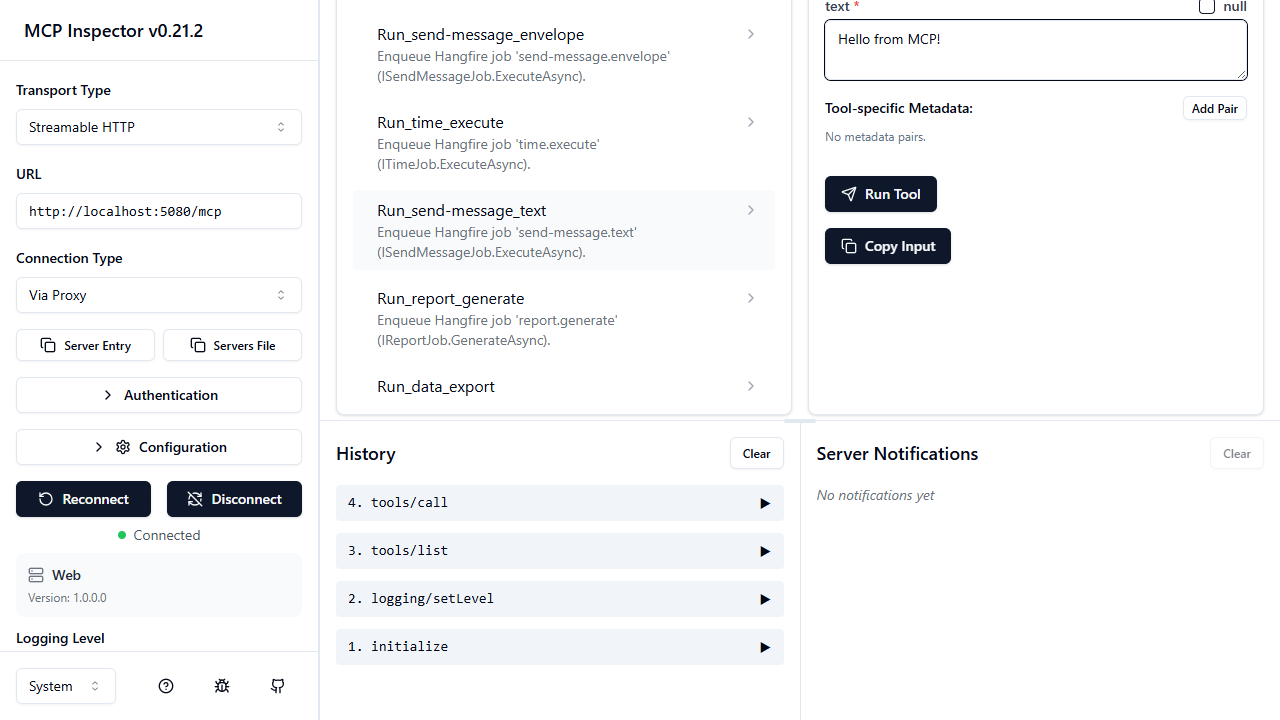
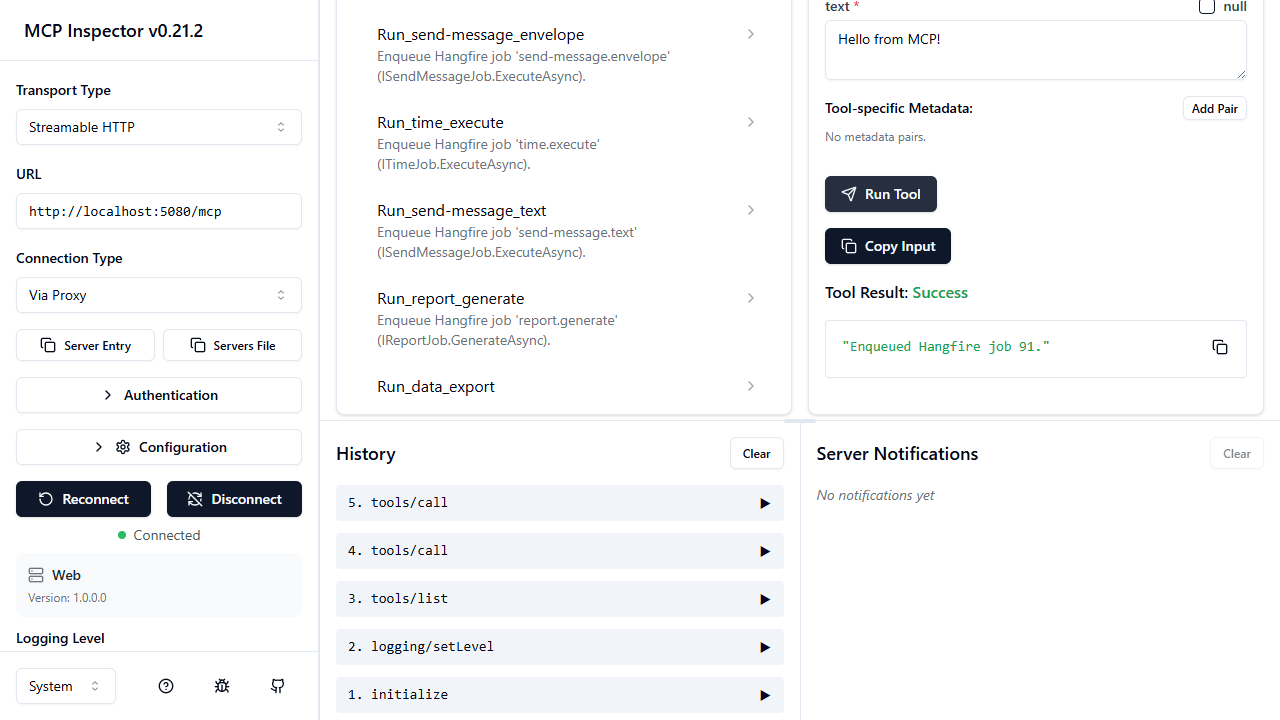
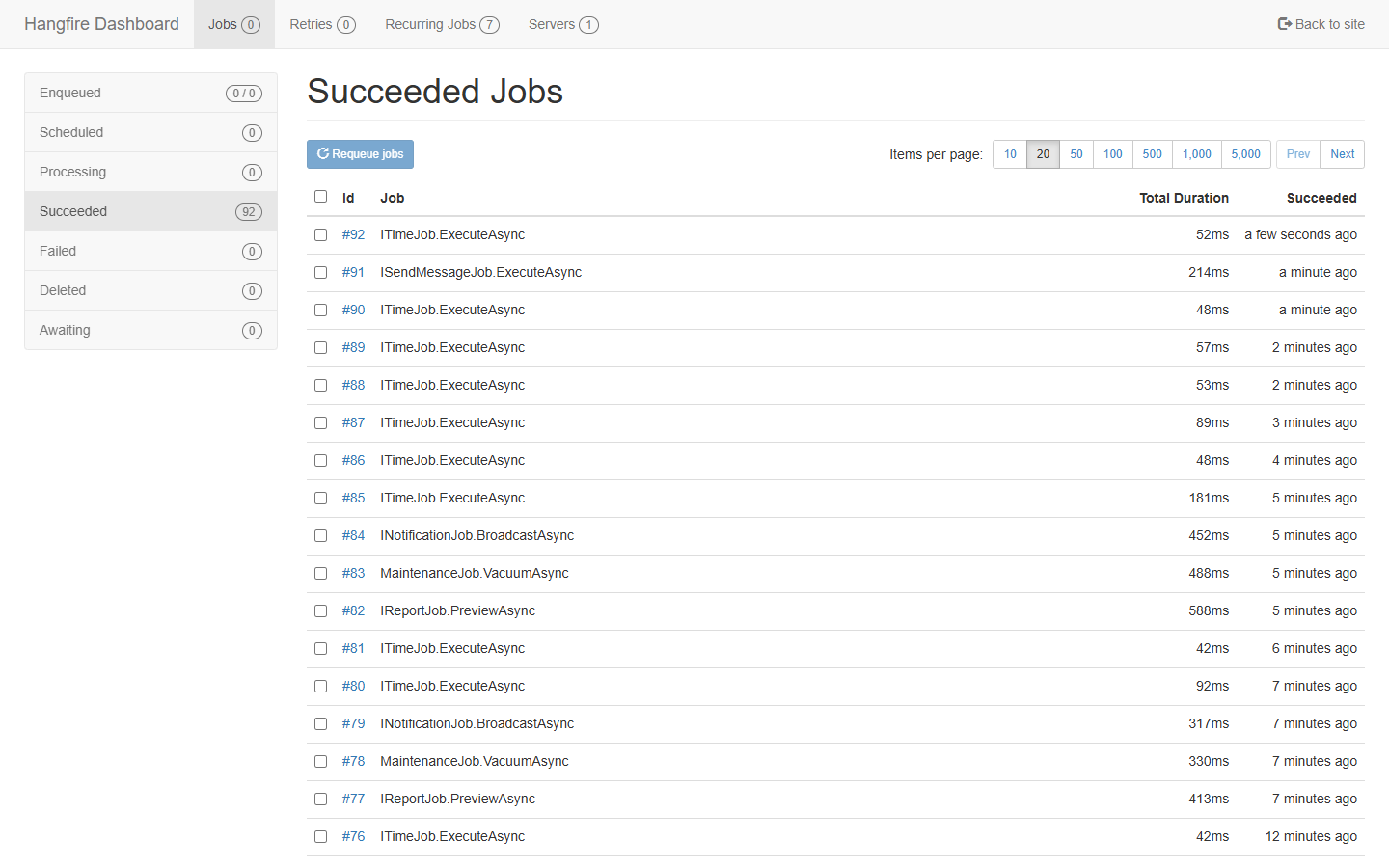
The point: the agent didn’t need to know anything about Hangfire. It saw a tool, filled in the schema, and the queue did its usual thing.
4. Authentication and authorization
The library is auth-agnostic on purpose. MapHangfireMcp("/mcp") returns IEndpointConventionBuilder, so you layer ASP.NET Core auth on top with .RequireAuthorization(...) like any other endpoint.
The full picture for a tool call looks like this:
Authentication
The sample uses Keycloak as the OAuth 2.0 / OIDC authorization server, JWT bearer for token validation, and the MCP-spec McpAuthenticationHandler to emit RFC 9728 challenges. That last bit matters: it lets MCP clients self-discover the protected-resource metadata at /.well-known/oauth-protected-resource/mcp, which is how you avoid hardcoding auth server URLs into clients.
app.MapHangfireMcp("/mcp")
    .RequireAuthorization(p => p
        .RequireAuthenticatedUser()
        .AddAuthenticationSchemes(McpAuthenticationDefaults.AuthenticationScheme));
The full setup (Keycloak realm import, JWT + AddMcp(...) resource metadata, the container-vs-host issuer URL caveat that bit me twice) is in the repo at docs/authentication.md. Other ASP.NET Core schemes work the same way: Entra ID, Auth0, custom JWT — nothing about the library cares which one you pick.
Per-job authorization
Endpoint auth is necessary but not enough. Once a client is past the /mcp gate it can list every tool, and you usually want different jobs guarded by different policies. So Nall.Hangfire.Mcp honors the standard [Authorize] attribute on job methods — opt in with AddJobAuthorization(), then decorate:
[Authorize(Policy = "jobs:run")]
Task GenerateAsync(int year, string format = "pdf", DateTimeOffset? since = null);
Under the hood, AddJobAuthorization() registers an AuthorizeAttributeFilter into the job invocation pipeline. When a tool call hits HangfireMcpHandlers, the pipeline collects [Authorize] attributes from the method and its declaring type, evaluates them against the current ClaimsPrincipal via IAuthorizationService, and short-circuits to an MCP error if any check fails. No Hangfire shim, no custom attribute. It’s the same [Authorize] you’d put on a controller action.
That keeps the threat model boring, which is what you want. The /mcp endpoint is gated by RequireAuthorization(). Per-job access is gated by ordinary ASP.NET Core policies. Catalog visibility and execution rights are separate concerns: an agent that lacks the right claims still sees jobs in the catalog it can’t run, and the call returns Forbidden when it tries.
Summary
Nall.Hangfire.Mcp collapses the “expose Hangfire to an MCP client” problem into a couple of lines of host code. Discovery comes from two sources (recurring storage at runtime, a Roslyn source generator at compile time). Schemas come from method signatures, with [Description] doing the heavy lifting. Auth and authorization reuse the standard ASP.NET Core stack: RequireAuthorization() on the endpoint, [Authorize(Policy = ...)] on the job.
Inside an Aspire AppHost, .WithMcpServer plus AddMcpInspector is most of the integration work. What you end up with is what I keep calling an Operations Pane: one surface where agents can run jobs and operate the queue, and where the security model is the same one you already use for the rest of the app.
Reference
- Repo: https://github.com/NikiforovAll/hangfire-mcp-dotnet
- NuGet: https://www.nuget.org/packages/Nall.Hangfire.Mcp
- Documentation: https://nikiforovall.github.io/hangfire-mcp-dotnet/
- Model Context Protocol
- MCP Inspector
- CommunityToolkit.Aspire McpInspector hosting integration
- RFC 9728, OAuth 2.0 Protected Resource Metadata
- Topics:
- dotnet (70) ·
- ai (30) ·
- dotnet (71) ·
- ai (38) ·
- hangfire (3) ·
- mcp (11) ·
- aspire (23) ·
- agents (23)
