
TL;DR: Redline is a two-way code review between you and Claude Code, inside VS Code. Claude posts its review of a diff as comment threads on the lines. You answer, add your own threads, and click Submit. The Claude Code session wakes, works through every thread, edits the code, and replies in the thread. It is a VS Code extension plus a Claude Code plugin, local only, no account.
Source: github.com/nikiforovall/redline. Docs: nikiforovall.blog/redline.
Problem: chat on one side, code on the other
Claude finishes a change and prints a summary. Then you open VS Code and read the diff cold. File by file, in whatever order the source control view sorts them, with no pointer to where the design decision is and which hunks are plumbing. Chat knows why the change looks the way it does. The editor shows what changed. You are the link between the two, and you hold that link in your head.
So the review is unprepared, and unprepared reviews get skipped. I know this because I skip them. I read the summary, scroll the diff, and accept. On a good day I paste a file path into chat and ask what a hunk is for. That is a poor use of an agent that just wrote the code and can explain every line of it.
The agent already knows what a reviewer needs. It knows what it changed, why, and in what order a reader should meet it. It has no way to put any of that on the diff. Redline gives it one.
Let the agent prepare the review
After Claude makes a change, type:
/redline:redline-tour
Claude reads its own diff and decides where a reader should start. Usually the entry point or the type everything depends on, then the callers, then the tests. It skips the mechanical hunks and posts one numbered note on each stop with what the hunk does and why the change needs it. The round opens in VS Code as a native multi-file diff, and Ctrl+Alt+] steps to the next stop.
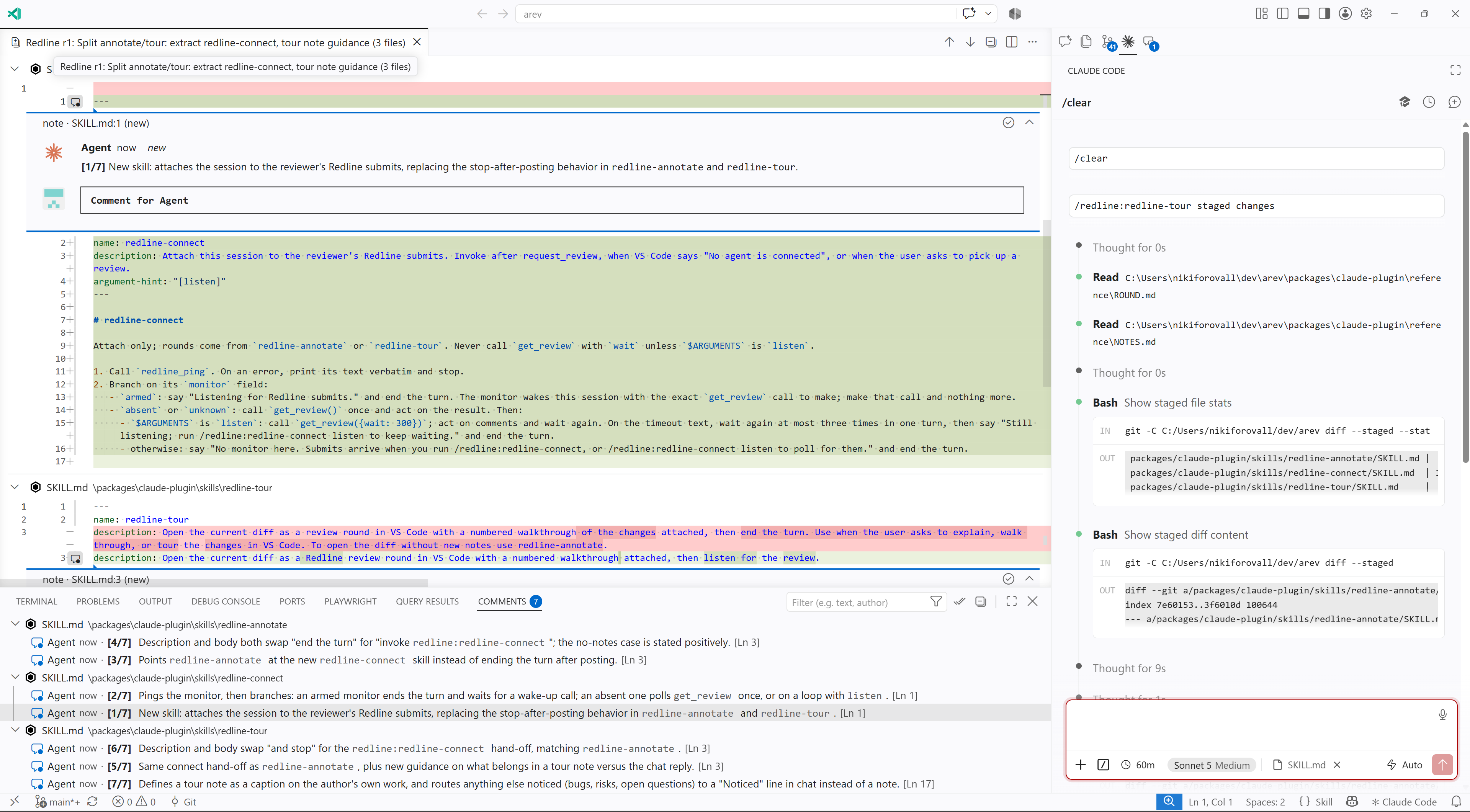
This is the mode I use most. It turns “read this diff” into “follow this path”, and the path comes from the one party that knows it. I come out of a tour knowing where the risk is, instead of having scrolled past it somewhere in the middle of file four.
Every stop is a normal comment thread. If a note does not convince you, reply under it.
And answer it on the line
Review mode is the same shape with findings instead of stops. Ask Claude to review a diff, with /code-review or in plain words, then type /redline:redline-annotate. The findings it just wrote in chat land as threads on the lines they are about. It reads like a pull request review, minus the pull request.
Now the human part. Reply inside Claude’s thread to agree, push back, or ask. Hover any changed line and click + to open a thread of your own. Then press Ctrl+Alt+R S to submit every open thread at once, or Ctrl+Alt+R Enter to send just the thread under the cursor without waiting for the rest.
Submit hands every open thread back to the Claude Code session in the terminal, and the session wakes on its own. For each thread Claude either lands the change and resolves it with a note, or answers your question and leaves it open for you. The reply shows up in the thread, next to your comment, on the line you were talking about. Resolved threads collapse, the diff refreshes in place, and the round stays open for the next pass.
You can also start from the VS Code side. Compare… in the Redline view picks a pair, working tree against main for example, and opens it with no notes. Type /redline:redline-tour and Claude adds the stops to that round. Or write your threads first, submit, and run /redline:redline-connect to have Claude pick them up.
You still read the code. But the agent has told you where to look first, and a question costs one reply on the line instead of a chat paragraph that starts with “in src/store.ts around line 120”.
Sharp edges
Redline works with Claude Code in a terminal. There the plugin registers a monitor, so a submit wakes an idle session. The Claude Code VS Code extension runs no plugin monitors. In the chat panel you pull instead with /redline:redline-connect listen, which polls for up to five minutes per call. It works, but the session is busy while it waits, so I keep review sessions in a terminal.
The round is a frozen snapshot of the diff, which is what keeps comments on the right lines. When Claude edits in response to your threads, the round refreshes and threads move with their lines. A thread whose line disappeared becomes detached. It leaves the editor and stays in the panel with its last context, so the question and the answer survive the fix that removed the line.
Install
Search for Redline in the VS Code Extensions view, or:
code --install-extension nikiforovall.redline-extension
The extension opens a Get started with Redline walkthrough. Its first step installs the Claude Code plugin with one button. By hand, from Claude Code:
/plugin marketplace add nikiforovall/redline
/plugin install redline@redline
Start a new Claude Code session afterwards so it loads the skills. VS Code keeps the extension updated.
Both halves talk over 127.0.0.1 with a token in a lock file under ~/.redline/. Rounds and comments stay in VS Code’s workspace storage. There is no telemetry.
Links
- Source: github.com/nikiforovall/redline
- Guide, one round end to end
- Reference, every command, shortcut, setting, MCP tool, and error text
- Redline on the VS Code Marketplace
- Claude Code plugin monitors, how a submit wakes the session
- Topics:
- ai (31) ·
- ai (39) ·
- agents (24) ·
- claude-code (7) ·
- developer-tools (19) ·
- vscode (4) ·
- code-review (1)
