
TL;DR
I built a RAG-based document intelligence assistant in .NET using IChatClient and IEmbeddingGenerator from Microsoft.Extensions.AI, VectorStoreCollection from Microsoft.Extensions.VectorData, Qdrant for vector search, Ollama for local inference, and .NET Aspire to wire it all together. The result is a provider-agnostic RAG app where switching from Ollama to OpenAI means changing one line of DI registration. This post walks through the abstractions, the pipeline, and how Aspire enables LLM-as-Judge evaluation in integration tests.
Source code: https://github.com/NikiforovAll/company-intel-dotnet
Introduction
Most AI integrations are tightly coupled to a specific provider. Your code imports the OpenAI SDK, or the Ollama client, or the Azure AI library. Switching providers means rewriting application code, not just configuration.
Microsoft.Extensions.AI (MEAI) gives you IChatClient and IEmbeddingGenerator. You register an implementation at startup. The rest of your code uses the abstraction. Change one line in DI. Your RAG pipeline, your agent, your evaluation tests — none of them care.
Microsoft.Extensions.VectorData does the same for vector stores. Define your data model with attributes, and the framework handles embedding and search.
This post walks through building a complete RAG application using these abstractions, with Aspire for orchestration and LLM-as-Judge for quality evaluation.
The building blocks
.NET has four AI building blocks. This post focuses on the first two.
| Block | Package | What it gives you |
|---|---|---|
| MEAI | Microsoft.Extensions.AI |
IChatClient, IEmbeddingGenerator — provider-agnostic interfaces |
| VectorData | Microsoft.Extensions.VectorData |
VectorStoreCollection, attribute-driven data models, auto-embedding |
| Agent Framework | Microsoft.Agents.AI |
IAIAgent, AG-UI protocol for streaming to frontends |
IChatClient and IEmbeddingGenerator
Here’s the entire AI registration for the app:
builder.AddOllamaApiClient("ollama-llama3-1").AddChatClient();
builder.AddOllamaApiClient("ollama-all-minilm").AddEmbeddingGenerator();
After this, any service can inject IChatClient or IEmbeddingGenerator<string, Embedding<float>> and use them without knowing what’s behind them.
The chat client usage looks like this:
IChatClient chatClient = sp.GetRequiredService<IChatClient>();
var response = await chatClient.GetResponseAsync(messages);
The same applies to embeddings:
var embedder = sp.GetRequiredService<IEmbeddingGenerator<string, Embedding<float>>>();
var embeddings = await embedder.GenerateAsync(["some text"]);
384-dimensional vectors from all-minilm, but your code doesn’t know or care about dimensions.
DelegatingChatClient: middleware for AI
MEAI borrows the middleware pattern from ASP.NET Core. DelegatingChatClient wraps an IChatClient and intercepts calls. You can add logging, caching, telemetry, retry logic — all as composable layers.
Here’s a real example from the project. OllamaSharp doesn’t set MessageId on streaming updates, but CopilotKit’s Zod schema rejects null values. The fix is a thin wrapper:
internal sealed class EnsureMessageIdChatClient(IChatClient inner) : DelegatingChatClient(inner)
{
    public override async IAsyncEnumerable<ChatResponseUpdate> GetStreamingResponseAsync(
        IEnumerable<ChatMessage> messages,
        ChatOptions? options = null,
        CancellationToken cancellationToken = default)
    {
        string? messageId = null;

        await foreach (var update in base.GetStreamingResponseAsync(
            messages, options, cancellationToken))
        {
            if (update.MessageId is null)
            {
                messageId ??= Guid.NewGuid().ToString("N");
                update.MessageId = messageId;
            }

            yield return update;
        }
    }
}
This is a compatibility shim, but the pattern is general. MEAI ships with built-in delegating clients for logging, OpenTelemetry, caching, and automatic function invocation. You compose them in DI like middleware:
builder.AddOllamaApiClient("ollama-llama3-1")
    .AddChatClient(pipeline => pipeline
        .UseLogging()
        .UseOpenTelemetry()
        .UseFunctionInvocation());
Each .Use*() call wraps the client in another layer. The outermost layer runs first, just like ASP.NET middleware.
VectorData with auto-embedding
This is the data model for chunks stored in Qdrant:
public sealed class DocumentRecord
{
    [VectorStoreKey]
    public Guid Id { get; set; } = Guid.NewGuid();

    [VectorStoreData]
    public string Text { get; set; } = "";

    [VectorStoreData]
    public string FileName { get; set; } = "";

    [VectorStoreData]
    public int ChunkIndex { get; set; }

    [VectorStoreData(IsIndexed = true)]
    public string Source { get; set; } = "";

    [VectorStoreVector(Dimensions: 384)]
    public string Embedding => Text;
}
The interesting part is the last property. [VectorStoreVector(Dimensions: 384)] on a string property means “embed this text automatically when upserting.” The Embedding property points to Text, so VectorData calls your registered IEmbeddingGenerator, gets the 384-dim vector, and stores it in Qdrant. No manual embedding calls anywhere in the ingestion code.
Registration ties it together:
builder.Services.AddSingleton<VectorStoreCollection<Guid, DocumentRecord>>(sp =>
{
    var embeddingGenerator = sp.GetRequiredService<IEmbeddingGenerator<string, Embedding<float>>>();
    var vectorStore = new QdrantVectorStore(
        sp.GetRequiredService<QdrantClient>(),
        ownsClient: false,
        new QdrantVectorStoreOptions { EmbeddingGenerator = embeddingGenerator }
    );
    return vectorStore.GetCollection<Guid, DocumentRecord>(CollectionName);
});
Pass the embedding generator to the vector store options. From that point, every UpsertAsync call automatically embeds text before storage. Every SearchAsync call automatically embeds the query before searching.
The RAG pipeline
Two phases:
Phase 1: INGEST                      Phase 2: QUERY
─────────────────                    ─────────────────
Upload PDF                           "What does the report say about X?"
  → Extract text (PdfPig)              → Embed query (all-minilm)
  → Chunk (recursive, 128 tokens)      → Vector search (Qdrant, top-5)
  → Auto-embed + upsert (Qdrant)       → LLM generates grounded answer
Ingestion
The ingestion service is straightforward:
public async Task<IngestionRecord> IngestPdfAsync(
    Stream pdfStream, string fileName, string source,
    long fileSizeBytes, CancellationToken ct = default)
{
    await collection.EnsureCollectionExistsAsync(ct);

    var extraction = PdfTextExtractor.Extract(pdfStream);
    var chunks = TextChunker.Chunk(extraction.Text);

    var records = chunks
        .Select((chunk, index) => new DocumentRecord
        {
            Text = chunk,
            FileName = fileName,
            ChunkIndex = index,
            Source = source,
        })
        .ToList();

    await collection.UpsertAsync(records, ct);
}
Notice what’s missing: no embedding calls. collection.UpsertAsync handles it because we configured auto-embedding on the DocumentRecord. PdfPig extracts text (pure .NET, no native dependencies), TextChunker splits it into chunks, and the vector store takes care of the rest.
The chunker is a recursive splitter targeting 128 tokens (~512 chars) with 25-token overlap. It tries paragraph boundaries first (\n\n), then lines (\n), then sentences (. ), then words.
Query
The search adapter creates a function that retrieves relevant chunks:
public static Func<string, CancellationToken, Task<IEnumerable<TextSearchResult>>> Create(
    VectorStoreCollection<Guid, DocumentRecord> collection, int top = 5) =>
    async (query, ct) =>
    {
        var results = new List<TextSearchResult>();
        await foreach (var result in collection.SearchAsync(
            query, top: top, cancellationToken: ct))
        {
            var sourceName = FormatSourceName(
                result.Record.FileName, result.Record.Text);
            results.Add(new TextSearchResult
            {
                Text = result.Record.Text,
                SourceName = sourceName,
                SourceLink = result.Record.Source,
            });
        }
        return results;
    };
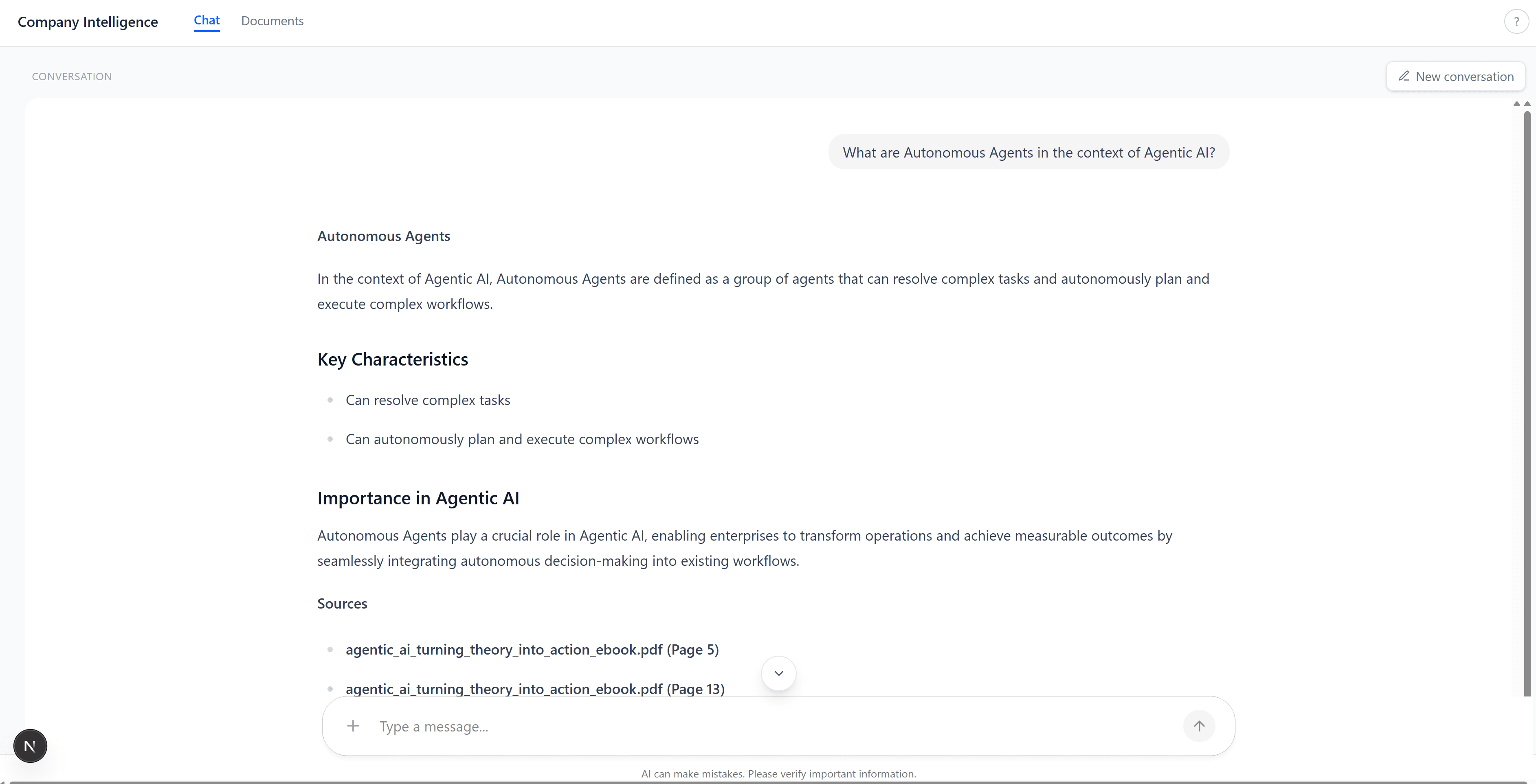
collection.SearchAsync takes a plain string query. The vector store auto-embeds it, runs similarity search against Qdrant, and returns matching records. Page numbers are extracted from chunk text via regex and formatted into the source name (e.g., “report.pdf (Page 5)”).
The agent then passes these chunks as context to the LLM with instructions to answer only from the provided context and cite sources.
(CopilotKit)"] -->|AG-UI SSE| API["ASP.NET Core
(MEAI Agent)"] API -->|embed query| Ollama_E["Ollama
all-minilm"] API -->|vector search| Qdrant["Qdrant"] API -->|generate answer| Ollama_L["Ollama
Llama 3.1"] Qdrant -->|top-5 chunks| API Ollama_E -->|384-dim vector| API
Aspire orchestration
Here’s the AppHost. This defines the entire system:
var builder = DistributedApplication.CreateBuilder(args);

var ollama = builder
    .AddOllama("ollama")
    .WithImageTag("latest")
    .WithDataVolume()
    .WithLifetime(ContainerLifetime.Persistent);

var llama = ollama.AddModel("llama3.1");
var embedModel = ollama.AddModel("all-minilm");

var qdrant = builder
    .AddQdrant("qdrant", apiKey: builder.AddParameter("qdrant-apikey", "localdev"))
    .WithImageTag("latest")
    .WithDataVolume()
    .WithLifetime(ContainerLifetime.Persistent);

var sqlite = builder
    .AddSqlite("ingestion-db", databasePath: sqlitePath, databaseFileName: "ingestion.db")
    .WithSqliteWeb();

var api = builder
    .AddProject<Projects.CompanyIntel_Api>("api")
    .WithReference(llama)
    .WithReference(embedModel)
    .WithReference(qdrant)
    .WithReference(sqlite);

builder
    .AddJavaScriptApp("ui", "../CompanyIntel.UI", "dev")
    .WithPnpm()
    .WithHttpEndpoint(port: 3000, env: "PORT")
    .WithEnvironment("AGENT_URL", api.GetEndpoint("http"))
    .WithOtlpExporter();

await builder.Build().RunAsync();
dotnet aspire run starts Ollama (pulls models if needed), Qdrant, SQLite with a web UI, the ASP.NET Core API, and the Next.js frontend. WithLifetime(ContainerLifetime.Persistent) means Ollama and Qdrant survive between runs. WithReference injects connection strings automatically — the API project never hardcodes a URL.
RAG evaluation with LLM-as-Judge
This is where Aspire really pays off. The evaluation tests spin up the entire stack — Ollama, Qdrant, API — in ephemeral containers, ingest a test PDF, ask questions, and score the answers using LLM-as-Judge.
The test fixture:
public class AspireAppFixture : IAsyncLifetime
{
    public async ValueTask InitializeAsync()
    {
        var appHost = await DistributedApplicationTestingBuilder.CreateAsync<Projects.CompanyIntel_AppHost>();

        _app = await appHost.BuildAsync(cts.Token);
        await _app.StartAsync(cts.Token);
        await _app.ResourceNotifications.WaitForResourceHealthyAsync("api", cts.Token);

        ApiClient = _app.CreateHttpClient("api", "http");
    }
}
The evaluation itself uses Microsoft.Extensions.AI.Evaluation.Quality, which provides four evaluators:
| Metric | What it measures |
|---|---|
| Relevance | Does the answer address the question? |
| Coherence | Is the answer well-structured and logical? |
| Groundedness | Is every claim backed by the retrieved context? |
| Retrieval | Did the search find the right chunks? |
Each evaluator uses the same Ollama llama3.1 as a judge and scores on a 1-5 scale:
[Theory]
[MemberData(nameof(EvalScenarios))]
public async Task EvaluateRagResponseQuality(string question)
{
    var chatResponse = await fixture.ApiClient.PostAsJsonAsync("/api/chat", new { message = question });

    var result = await chatResponse.Content.ReadFromJsonAsync<ChatApiResponse>();

    IChatClient judgeChatClient = new OllamaApiClient(fixture.OllamaEndpoint, "llama3.1");
    var chatConfig = new ChatConfiguration(judgeChatClient);

    IEvaluator[] evaluators =
    [
        new RelevanceEvaluator(),
        new CoherenceEvaluator(),
        new GroundednessEvaluator(),
        new RetrievalEvaluator(),
    ];

    foreach (var evaluator in evaluators)
    {
        var evalResult = await evaluator.EvaluateAsync(
            messages, modelResponse, chatConfig, additionalContext, cts.Token);

        foreach (var metricName in evaluator.EvaluationMetricNames)
        {
            var metric = evalResult.Get<NumericMetric>(metricName);
            Assert.True(metric.Value >= 3,
                $"{metricName} score too low: {metric.Value}");
        }
    }
}
Test Runner"] -->|start stack| Stack["Ollama + Qdrant + API
(ephemeral containers)"] Stack -->|ready| Ingest["Ingest
test PDF"] Ingest -->|for each scenario| ChatAPI["Chat API
/api/chat"] ChatAPI -->|answer + context| Judge["Judge LLM
(llama3.1)"] Judge -->|scores 1-5| Metrics["Relevance · Coherence
Groundedness · Retrieval"] Metrics -->|all >= 3?| Assert["xUnit Assert"]
Groundedness is the most interesting metric here. It checks whether every claim in the answer can be traced back to the retrieved context. A score below 3 means the model is hallucinating — making claims the documents don’t support.
Demo
The chat tab. Ask a question, get a grounded answer with citations:
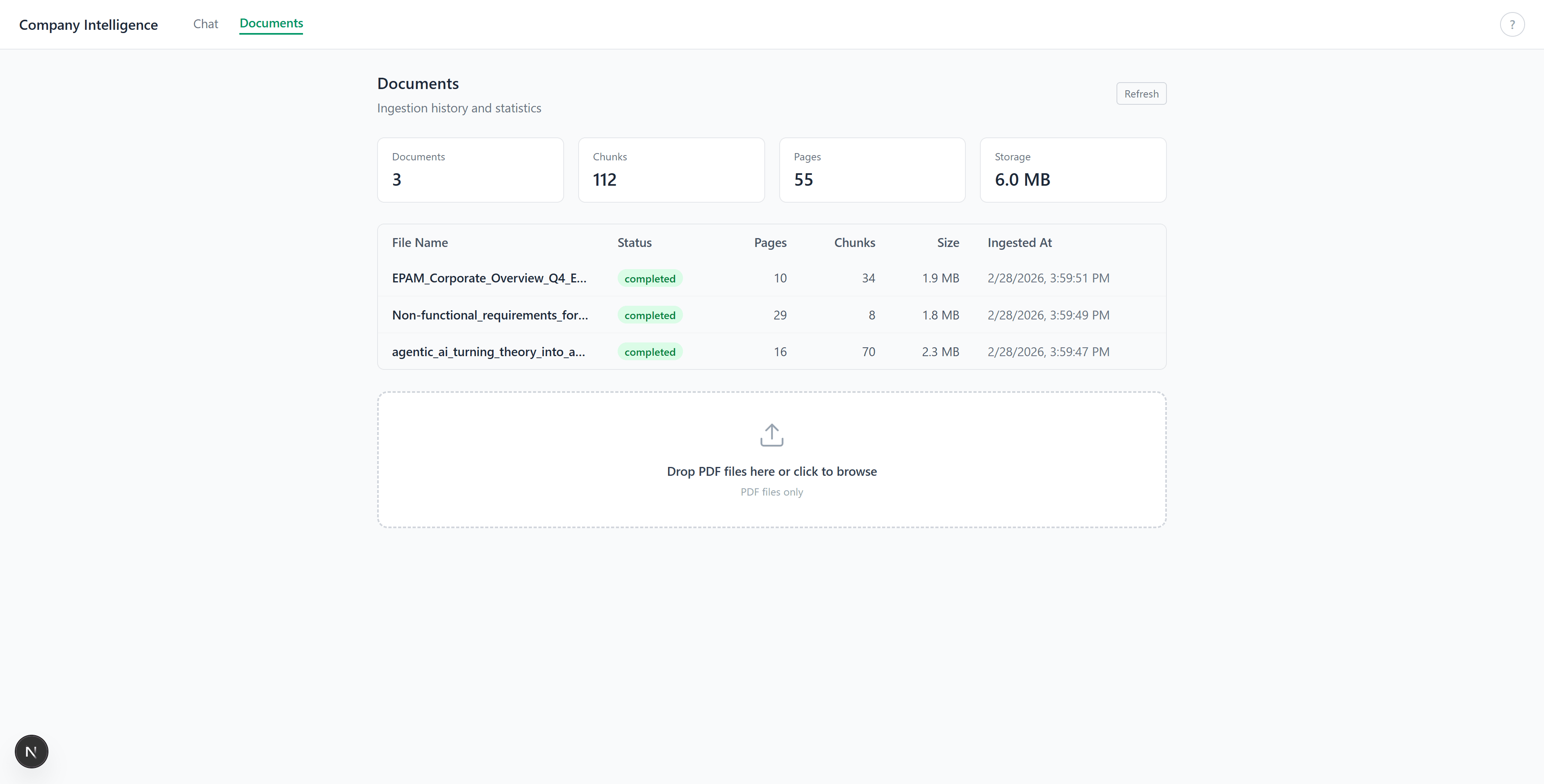
The documents tab. Upload PDFs, see ingestion stats (pages, chunks, size):
Summary
The .NET AI building blocks let you write RAG applications without coupling to a specific provider.
What worked well:
- VectorData’s auto-embedding removed all manual embedding calls from the codebase. Define
[VectorStoreVector]on a string property, and upsert/search just works. -
DelegatingChatClienthandled a real compatibility issue (missing MessageId in OllamaSharp streaming) without touching the rest of the code. - Aspire’s
DistributedApplicationTestingBuildermade RAG evaluation reproducible: ephemeral containers, random ports, clean state per run. -
Microsoft.Extensions.AI.Evaluation.Qualitygave us four evaluation metrics out of the box, using the same local LLM as judge.
References
- Topics:
- dotnet (70) ·
- ai (31) ·
- dotnet (71) ·
- aspire (23) ·
- microsoft-extensions-ai (4) ·
- rag (4) ·
- qdrant (2) ·
- ollama (2)
